iPad・iPhone 対応の舞台配置図アプリA stage layout app for iPad & iPhone

配置図づくりを、
名簿から数分で。

Seating charts,
from your roster in minutes.

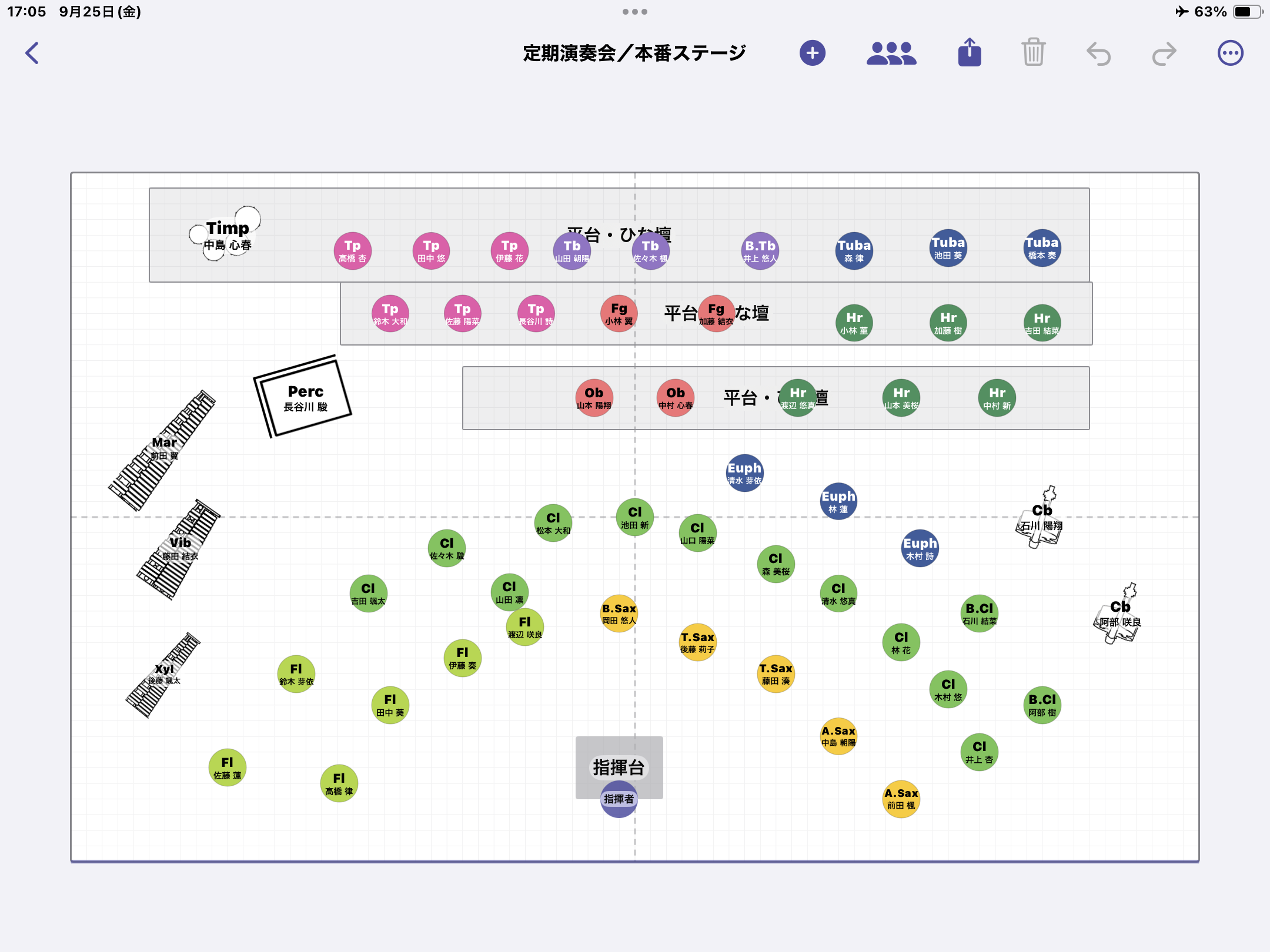
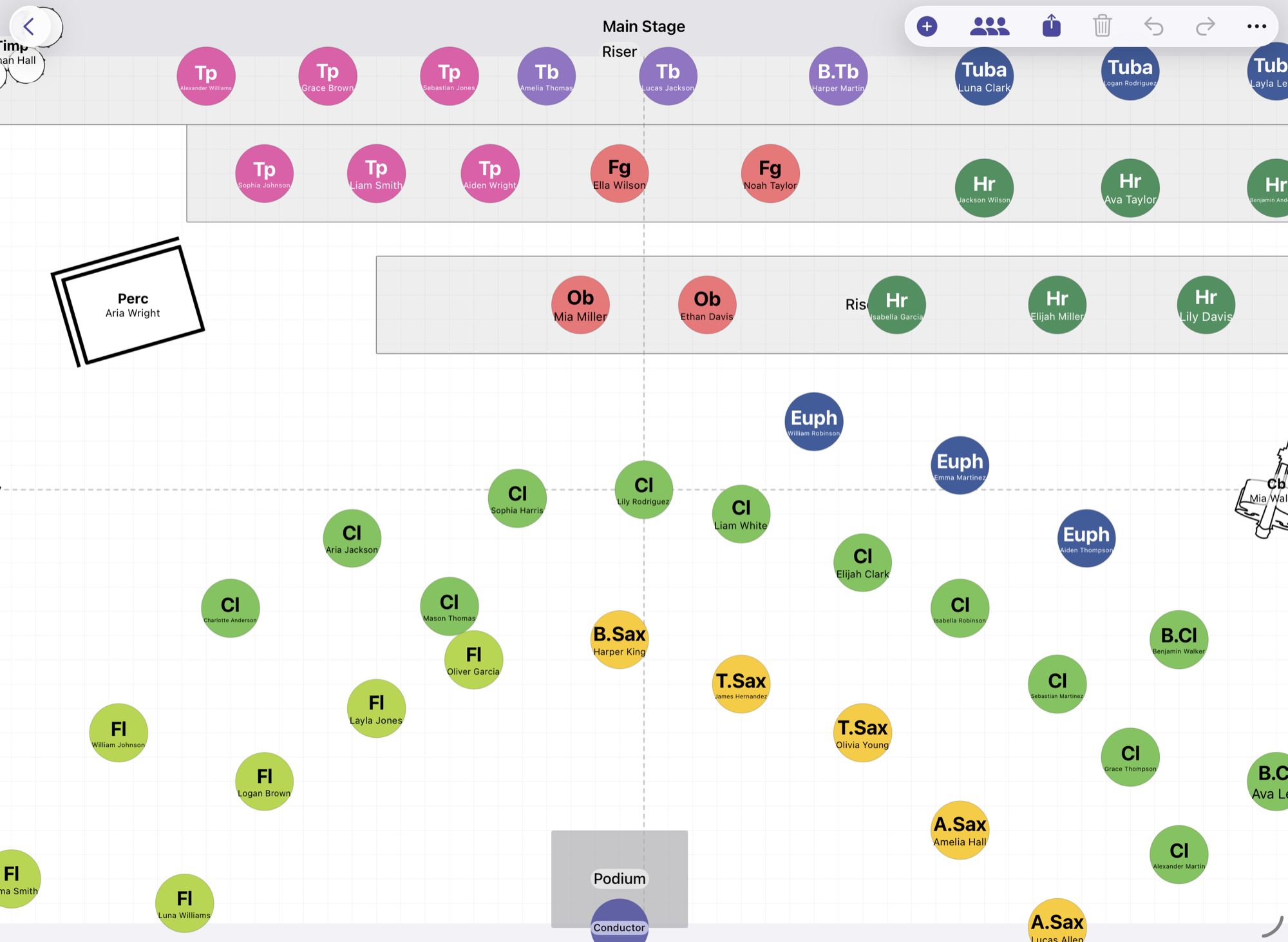
団員とパートを登録すれば、演奏会ごとの舞台配置図が並んだ状態でできあがります。iPadで作って、iPhoneで確認。PDFや画像に書き出して、そのまま配れます。Register your members and their parts, and each performance's stage layout comes ready with everyone already placed. Build it on iPad, check it on iPhone, and export to PDF or image to hand out.

iPadで表示した演奏会の舞台配置図(奏者・大型楽器・平台・指揮台)A concert stage layout shown on iPad — players, large instruments, risers and the conductor's podium

こんな場で使われることを想定していますMade for ensembles like these

できることWhat you can do

部活の顧問やパートリーダーが、紙と鉛筆でやっていた作業をそのまま置き換えられるように作りました。Built to replace the paper-and-pencil seating charts that advisors and section leaders make by hand.

  • Fl佐藤 美咲Misaki Satoさとう みさきFlute2年Y2
  • Cl高橋 蓮Ren Takahashiたかはし れんClarinet3年Y3
  • A.Sax伊藤 葵Aoi Itoいとう あおいAlto Sax1年Y1

名簿から自動で並べるAuto-place from your roster

団員の楽器とパートを登録しておけば、演奏会ごとの配置図に並んだ状態から始められます。あとは指で動かして整えるだけです。Register each member's instrument and part, and every performance starts with everyone already placed. Then just drag to fine-tune.

FlClObA.SaxTpHrTbTubaPercPf

楽器の色と略称で読めるRead at a glance by color

Fl、Cl、Tp などの略称と楽器ごとの色で表示します。色は設定で変えられ、名簿や書き出したPDFにも同じ色が反映されます。Members show as Fl, Cl, Tp… with a color per instrument. Colors are editable and carry through to the roster and exported PDFs.

Hr
団員Member
Hr
賛助Guest

ゲストは点線で区別Guests marked with a dashed outline

名簿にいない賛助やエキストラも、配置図へ直接追加できます。点線の丸と区分ラベルで表示し、凡例にも自動で載ります。Add guests and extras who aren't in your roster right on the layout. They show with a dashed circle and a label, and appear in the legend automatically.

PDF・画像で書き出して配るExport as PDF or image

できあがった配置図はPDFのほか、PNG・JPEGの画像としても書き出せます。印刷して舞台袖に貼る、団員へ画像で共有する、といった使い方ができます。氏名を載せる/載せないも選べます。Export finished layouts as PDF, or as PNG / JPEG images. Print them for backstage, or share images with your members. Choose whether to include names.

演奏会ごとに保存・コピーSave & copy per performance

本番ステージや曲ごとの配置図を演奏会単位で保存します。前回の配置図を別の演奏会へコピーして、手直しから始められます。Keep your main-stage and per-piece layouts by performance. Copy a previous layout into another performance and start from there.

iPadとiPhoneで同期Sync across iPad & iPhone

iCloudを使い、iPadで作った配置図をiPhoneでも確認できます。名簿・演奏会・配置図が自動で同期します。With iCloud, layouts you build on iPad show up on iPhone. Roster, performances and layouts sync automatically.

動画で見る使い方See it in action

操作のようすを、iPadとiPhoneそれぞれの画面で収録しています。We recorded the workflow on both iPad and iPhone (narration in Japanese).

iPadでの作成On iPad

名簿の登録から配置図の書き出しまで、ひと通りの流れを通しで見られます。Watch the whole flow, from registering the roster to exporting the layout.

iPhoneだけでも作成から出力までできますDo everything on iPhone, too

iPadがなくても、名簿の登録から配置図の作成、PDF・画像の出力まで、iPhoneだけで完結します。Even without an iPad, you can register the roster, build the layout, and export to PDF or image — all on iPhone.

はじめかたGetting started

最初の配置図ができるまでの流れです。How your first layout comes together.

  1. 1

    団員とパートを登録するRegister members & parts

    名前・ふりがな・楽器・学年を入力します。名簿は演奏会をまたいで使い回せます。Enter name, reading, instrument and year. Your roster carries across performances.

  2. 2

    演奏会を作るCreate a performance

    本番日と会場名、舞台の間口と奥行きを入れます。Set the date, venue, and the stage width and depth.

  3. 3

    配置図を開いて並べるOpen the layout & arrange

    自動で並んだ奏者を動かし、平台・譜面台・指揮台を置きます。Move the auto-placed players, and add risers, stands and the podium.

  4. 4

    PDFに書き出すExport to PDF

    凡例つきのPDFを印刷・共有します。Print or share a PDF with a legend.

よくある質問FAQ

ここにない質問は、お問い合わせフォームから送ってください。Don't see your question? Send it from the contact form.

iPhoneだけでも使えますか?Can I use it on iPhone only?

使えます。配置図の作成と編集は画面の広いiPadが中心ですが、iPhoneでも閲覧・確認と軽い修正ができます。Yes. Building and editing layouts is easiest on the larger iPad, but you can view, check and make light edits on iPhone.

平台や譜面台、打楽器も置けますか?Can I place risers, stands and percussion?

置けます。平台・指揮台・譜面台などの構造物や、ティンパニ・マリンバなどの設置型楽器は、名称つきで配置でき、90°回転もできます。Yes. Structures like risers, the podium and music stands, and set instruments like timpani and marimba, can be placed with labels and rotated 90°.

名簿に入っていない人を配置図に置けますか?Can I place people who aren't in the roster?

置けます。賛助・エキストラ・第1部のみ出演などの区分を選ぶと、点線の丸で表示されます。Yes. Choose a category such as guest, extra or "Part 1 only," and they show as a dashed circle.

データはどこに保存されますか?Where is my data stored?

端末の中に保存されます。iCloudにサインインしていれば、iPadとiPhoneの間で名簿・演奏会・配置図が自動で同期します。On your device. When you're signed in to iCloud, your roster, performances and layouts sync automatically between iPad and iPhone.

オーケストラや合奏団でも使えますか?Does it work for orchestras and ensembles?

使えます。弦楽器やピアノの色と略称も用意しています。Yes. Colors and abbreviations for strings and piano are included.

ご意見・不具合の報告Feedback & bug reports

使っていて困ったこと、ほしい機能を教えてください。いただいた内容は開発の参考にしています。アプリ内の「設定 → ご意見・ご要望」からも送れます。Tell us what's not working or what you'd like. We use it to guide development. You can also send feedback from Settings → Feedback in the app.

フォームを開くOpen the form

Android版・Web版の希望登録Request Android / Web

ほかの端末で使いたい方は、メールアドレスを登録してください。希望の数を見て開発するかを決めます。Want it on another device? Register your email and we'll decide based on interest.

希望を登録するRegister interest